#!/usr/bin/perl

# Filename: import.pl
# Create LDAP addressbook or account by read vpopmail database on MYSQL
# konangsupian@gmail.com
# 13 Okt 2006
# ------------------------
# Updated Sept 2007
# Command shell to get realname & username from vpopmail database.
# mysql -u vpopmail -pmyvpopmailpasswd -e "use vpopmail; select pw_gecos,pw_name from mycompany_com;" > mycompany.txt


$ou = "addressbook";
open(LOGFILE,"mycompany.txt") or die("Could not open file.");
while (<LOGFILE>) {
        chop($_);
        @pisah    = split("\t",$_);
        $email    = $pisah[1]."\@mycompany\.com";
        $realname = $pisah[0];
        @name     = split(" ",$realname);
        $var  = "";
        $var .= "\r\n\r\n";
        $var .= "dn: cn=$realname ($email),ou=$ou,dc=mycompany,dc=com\r\n";
        $var .= "objectClass: top\r\n";
        $var .= "objectClass: person\r\n";
        $var .= "objectClass: organizationalPerson\r\n";
        $var .= "objectClass: inetOrgPerson\r\n";
        #$var .= "objectClass: user\r\n";
        $var .= "cn: $realname ($email)\r\n";
        $var .= "givenName: $realname\r\n";
        $var .= "sn: $name[0]\r\n";
        $var .= "mail: $email\r\n";
        $var .= "physicalDeliveryOfficeName: Gd. Kwarnas Pramuka Jl. Medan Merdeka Timur No. 6 Jakarta\r\n";
        $var .= "postalAddress: Gd. Kwarnas Pramuka Jl. Medan Merdeka Timur No. 6 Jakarta\r\n";
        $var .= "o: MYCOMPANY\r\n";
        $var .= "l: Jakarta\r\n";
        $var .= "ou: $ou\r\n";
        $var .= "st: DKI\r\n";
        $var .= "postalCode: 10110\r\n";
        $var .= "telephoneNumber: +62-21-12345\r\n";
        $var .= "facsimileTelephoneNumber: +62-21-54321\r\n";
        $var .= "pager: +62-\r\n";
        $var .= "mobile: +62-\r\n";
        $var .= "homePhone: +62-\r\n";
        #$var .= "associatedDomain: internaldomain.com\r\n";
        #$var .= "ou: mdgti\r\n";
        #$var .= "userPassword: {MD5}yFfXwwYLUsJXeqTg==\r\n";
        print $var;
}
close($LOGFILE);

# End of import.pl


Action on shell
# ./import.pl > mycompany.ldif

Import data to LDAP with command :
# ldapadd -x -v -c -D "dc=mycompany,dc=com" -W < mycompany.ldif
Enter password: ********

*** Done ****
Showing posts with label SMTP. Show all posts
Showing posts with label SMTP. Show all posts
Wednesday, September 26, 2007
Create LDAP Addressbook from Qmail Account

Sunday, September 23, 2007
Qmail Cluster ? Qmail Partitioning ? Qmail - Postfix Collaboration
Why I use questions on title above?
Because I' m not sure with my concept below is called Qmail Cluster.
Clustering that I get from here is :
CLUSTERING - Clustering is a technology using two or more computers that function together as a single entity for fault tolerance and load balancing. This can increase reliability and uptime in a client/server environment. One computer will sense when another computer is failing or getting bogged down and will take over full operation or just some of its tasks, depending on whether it's a complete fail-over design or just load balancing.
I agree that my design below on picture is called Qmail Partitioning because in my design there is no fail over function and or take over function. In my design only separate a single domain into some server that separated by location on same WAN/MPLS.
I am not writing completely because I assume you are Linux/Unix system administrator so you can get complete of Qmail and Postfix resources at their official site :
http://www.qmail.org/
http://www.lifewithqmail.org/
http://www.postfix.org/
 Note : my design above is already tested and running well.
Wednesday, September 19, 2007
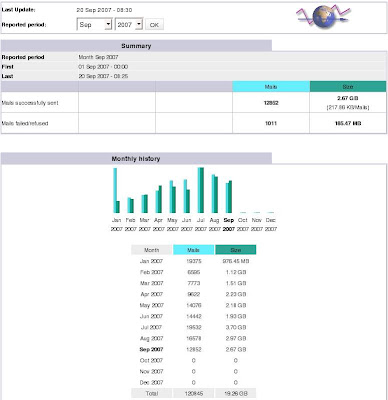
Configure Awstats for Qmail Log
You may have Qmail statistic before read this article. I don't know what you have is better or similar with this one, Awstats Qmail log analyzer. But if you have time you may try this one.
To create Awstats to analyze Qmail Log you have to prepare :
- Log repository, put on crontab and will grep qmail log every 10 minutes. May this not accurate because the log can be duplicate but you can sort this for unique row. Place this log at /var/log/awstats.qmail
[getlog.sh]
#!/bin/sh#!/bin/sh
cat /var/log/qmail/qmail-pop3d/current > /var/log/awstats.qmail
cat /var/log/qmail/qmail-send/current >> /var/log/awstats.qmail
cat /var/log/qmail/qmail-smtpd/current >> /var/log/awstats.qmail - Awstats, download this cute statistics from http://awstats.sourceforge.net/
- Get the script tools that will be used for at ../path/to/awstats/tools. You only need maillogconvert.pl script.
- Create the small program from Phil Hagen named "qmail2awstats.pl" and
[qmail2awstats.pl]#!/usr/bin/perl
# written by phil hagen on 27sep03
while (<>) {
@months = ('NUL', 'Jan', 'Feb', 'Mar', 'Apr', 'May', 'Jun', 'Jul', 'Aug', 'Sep', 'Oct', 'Nov', 'Dec'); $hostname = `hostname`;
# $hostname = `hostname -s`;
chomp $hostname;
$line = $_;
$line =~ s/\d{4}-(\d{2})-(\d{2}) (\d{2}:\d{2}:\d{2}).\d{9} (.*)/$months[$1] $2 $3 $hostname qmail: 0000000000.000000 $4/; print $line;
} - Edit the Awstats configuration that placed or may have to create at /etc/awstats/awstats.mail.conf that called only short name "mail" later in awstats command.
[/etc/awstats/awstats.mail.conf]LogFile="/usr/local/bin/tai64nlocal < /var/log/awstats.qmail |\
/var/www/htdocs/awstats/tools/qmail2awstats.pl | \
/var/www/htdocs/awstats/tools/maillogconvert.pl standard | "
SiteDomain="mail.mydomain.com"
HostAliases="mail.mydomain.com"
DirData="/data/awstats"
DirCgi="/awstats"
DirIcons="/awstatsicons"
AllowToUpdateStatsFromBrowser=0
AllowFullYearView=2
LogType=M
LogFormat="%time2 %email %email_r %host %host_r %method %url %code %bytesd"
LevelForBrowsersDetection=0
LevelForOSDetection=0
LevelForRefererAnalyze=0
LevelForRobotsDetection=0
LevelForWormsDetection=0
LevelForSearchEnginesDetection=0
LevelForFileTypesDetection=0
ShowMenu=1
ShowSummary=HB
ShowMonthStats=HB
ShowDaysOfMonthStats=HB
ShowDaysOfWeekStats=HB
ShowHoursStats=HB
ShowDomainsStats=0
ShowHostsStats=HBL
ShowAuthenticatedUsers=0
ShowRobotsStats=0
ShowEMailSenders=HBML
ShowEMailReceivers=HBML
ShowSessionsStats=0
ShowPagesStats=0
ShowFileTypesStats=0
ShowFileSizesStats=0
ShowBrowsersStats=0
ShowOSStats=0
ShowOriginStats=0
ShowKeyphrasesStats=0
ShowKeywordsStats=0
ShowMiscStats=0
ShowHTTPErrorsStats=0
ShowSMTPErrorsStats=1
Why the awstats configuration must be at /etc/awstats ? Here is the DOC:
# AWSTATS CONFIGURE FILE 6.6
#-----------------------------------------------------------------------------
# Copy this file into awstats.www.mydomain.conf and edit this new config file
# to setup AWStats (See documentation in docs/ directory).
# The config file must be in /etc/awstats, /usr/local/etc/awstats or /etc (for
# Unix/Linux) or same directory than awstats.pl (Windows, Mac, Unix/Linux...)
# To include an environment variable in any parameter (AWStats will replace
# it with its value when reading it), follow the example:
# Parameter="__ENVNAME__"
# Note that environment variable AWSTATS_CURRENT_CONFIG is always defined with
# the config value in an AWStats running session and can be used like others.
#----------------------------------------------------------------------------- - Create directory to save the log data
# mkdir -p /data/awstats - Add and change the cgi alias on apache, the configuration is :
ScriptAlias /cgi-bin/ "/var/www/cgi-bin/"

<Directory "/var/www/cgi-bin">
  AllowOverride None
  Options None
  Order allow,deny
  Allow from all
</Directory>

Alias /awstatsclasses "/var/www/htdocs/awstats/wwwroot/classes/"
Alias /awstatscss "/var/www/htdocs/awstats/wwwroot/css/"
Alias /awstatsicons "/var/www/htdocs/awstats/wwwroot/icon/"
ScriptAlias /awstats/ "/var/www/htdocs/awstats/wwwroot/cgi-bin/"

<Directory "/var/www/htdocs/awstats/wwwroot">
  Options None
  AllowOverride None
  Order allow,deny
  Allow from all
</Directory>
Restart apache. - Create and or add in crontab :
#Awstats mail statistics
*/10 * * * * /var/www/htdocs/awstats/tools/getlog.sh
*/15 * * * * /var/www/htdocs/awstats/wwwroot/cgi-bin/awstats.pl -update -config=mail > /dev/null - Run at your browser to access your mail statistics :
http://www.mydomain.com/awstats/awstats.pl?config=mail - Done.

Tuesday, August 21, 2007
Qmail Footer : HTML & Attachment Support
Qmail version : 1.03
Please download QMAIL Source from
http://www.qmail.org/
http://cr.yp.to/qmail.html
http://www.qmailrocks.com/
http://www.tnpi.biz/internet/mail/toaster/
FOOTER:
http://untroubled.org/bglibs/
http://www.pldaniels.com/altermime/
http://untroubled.org/qmail-qfilter/
Configure BGLIBS – For qmail-qfilter
http://untroubled.org/bglibs/docs/modules.html
# tar –zxvf bglibs-1.102.tar.gz
# cd bglibs-1.102
# make
# make install
Don't forget to copy share library libbg-sysdeps.so.1 to /usr/lib, this one need by qmail-qfilter.
ALTERMIME – Program to add mail footer
# tar –zxvf altermime-0.3.7.tar.gz
# cd altermime-0.3.7
Hack source program mime_alter.c (remove char "=")
Origin:
if (dd->disclaimer_text_HTML == NULL) {
fprintf(newf,"=\r\n");
AM_ntorn(qp_data, newf);
fprintf(newf,"=\r\n");
} else {
fprintf(newf,"=\r\n");
AM_ntorn(qp_data, newf);
fprintf(newf,"=\r\n");
}
To:
if (dd->disclaimer_text_HTML == NULL) {
fprintf(newf,"\r\n");
AM_ntorn(qp_data, newf);
fprintf(newf,"\r\n");
} else {
fprintf(newf,"\r\n");
AM_ntorn(qp_data, newf);
fprintf(newf,"\r\n");
}
Hack source qpe.c (remove char "=" and length of str)
Origin:
if (current_line_length +charout_size >= 76) {
snprintf(op, out_remaining, "%s=\r\n", paragraph);
op+= strlen(paragraph) +3; /** jump the output + =\r\n **/
out_remaining-= (strlen(paragraph) +3);
…
To:
if (current_line_length +charout_size >= 76) {
snprintf(op, out_remaining, "%s\r\n", paragraph);
op+= strlen(paragraph); /** jump the output + =\r\n **/
out_remaining-= (strlen(paragraph));
…
# make
# make install
QMAIL-QFILTER – Filtering mail and then forward to qmail-queue
# tar –zxvf qmail-qfilter-2.1.tar.gz
Edit file qmail-qfilter.c, Cumtom as you need:
#define TMPDIR "/var/tmp/qmail-qfilter"
#define QMAIL_QUEUE "/var/qmail/bin/qmail-queue"
# make
# make install
# mkdir –p /var/tmp/qmail-qfilter
# chmod 777 /var/tmp/qmail-qfilter
# mkdir –p /var/qmail/control/disclaimer
# touch /var/qmail/control/disclaimer/mydomain.com.txt
# touch /var/qmail/control/disclaimer/mydomain.com.html
Type your disclaimer or footer :
Example:
-------------------------------------
NOTE: The information contained in this e-mail is intended only for the use of the individual or entity named above and may contain information that is privi
leged, confidential and exempt from disclosure under applicable law. If you are not the intended party to receive the message and its attachment(s), you are
hereby notified that any dissemination, distribution or copy of the message is strictly prohibited. Please immediately notify the sender and delete the messa
ge as soon as possible. Thank you for kind attention.
Create file:
# touch /var/qmail/bin/qmail-disclaimer
Copy the text below and paste to /var/qmail/bin/qmail-disclaimer :
#!/bin/sh
QMAILHOST=mydomain.com
INSPECT_DIR=/var/tmp/qmail-qfilter
if [ ! -f /var/qmail/control/disclaimer/$QMAILHOST.txt ]
then
cat
exit 0
fi
EX_TEMPFAIL=31
EX_UNAVAILABLE=31
trap "rm -f /var/tmp/qmail-qfilter/in.$$" 0 1 2 3 15
cd $INSPECT_DIR { echo Error: $INSPECT_DIR does not exist; exit $EX_TEMPFAIL; }
cat >$INSPECT_DIR/in.$$ { echo $QMAILHOST - Error: Cannot write to disk; exit $EX_TEMPFAIL; }
/usr/local/bin/altermime --input=$INSPECT_DIR/in.$$ \
--htmltoo \
--disclaimer=/var/qmail/control/disclaimer/$QMAILHOST.txt \
--disclaimer-html=/var/qmail/control/disclaimer/$QMAILHOST.html { echo Error: message rejected; exit $EX_UNAVAILABLE; }
cat $INSPECT_DIR/in.$$
rm in.$$
exit $?
Create file:
# touch /var/qmail/bin/qmail-tail
Copy the text below and paste to /var/qmail/bin/qmail-tail:
#!/bin/sh
exec /usr/bin/qmail-qfilter /var/qmail/bin/qmail-disclaimer /var/qmail/bin/qmail-inject -n
Edit file /etc/smtpd:
127.:allow,RELAYCLIENT="",QMAILQUEUE="/var/qmail/bin/qmail-tail"
10.80.120.:allow,RELAYCLIENT="",RBLSMTPD="",QMAILQUEUE="/var/qmail/bin/qmail-tail"
10.80.121.:allow,RELAYCLIENT="",RBLSMTPD="",QMAILQUEUE="/var/qmail/bin/qmail-tail "
10.80.122.:allow,RELAYCLIENT="",RBLSMTPD="",QMAILQUEUE="/var/qmail/bin/qmail-tail"
#10.80.123.:allow,RELAYCLIENT="",RBLSMTPD=""
10.80.123.:allow,RELAYCLIENT="",RBLSMTPD="",QMAILQUEUE="/var/qmail/bin/qmail-tail"
10.11.:allow,RELAYCLIENT="",RBLSMTPD="",QMAILQUEUE="/var/qmail/bin/qmail-tail"
10.3.4.:allow,RELAYCLIENT="",RBLSMTPD="",QMAILQUEUE="/var/qmail/bin/qmail-tail"
192.168..:allow,RELAYCLIENT="",RBLSMTPD="",QMAILQUEUE="/var/qmail/bin/qmail-tail"
#:allow
:allow,HELODNSCHECK="",MFDNSCHECK=""
# /var/qmail/bin/qmailctl cdb
# /var/qmail/bin/qmailctl restart
Exec Path :
/usr/bin/qmail-qfilter
/usr/local/bin/altermime
/usr/local/bglibs/lib
Config file can be found at source tree before compilation.
Links : http://forum.qmailrocks.org/showthread.php?t=2412
Subscribe to:
Posts (Atom)
